Quickstart: DynaCLR
Cell Dynamics Contrastive Learning of Representations
Estimated time to complete: 25-30 minutes
Learning Goals
- Download the DynaCLR model and run it on an example dataset
- Visualize the learned embeddings
Prerequisites
- Python>=3.11
Introduction
Model
The DynaCLR model architecture consists of three main components designed to map 3D multi-channel patches of single cells to a temporally regularized embedding space.
Example Dataset
The A549 example dataset used in this quick-start guide contains quantitative phase and paired fluorescence images of viral sensor reporter. It is stored in OME-Zarr format and can be downloaded from here.
It has pre-computed statistics for normalization, generated using the viscy preprocess CLI.
Refer to our preprint for more details about how the dataset and model were generated.
User Data
The DynaCLR-DENV-VS+Ph model only requires label-free (quantitative phase) and fluorescence images for inference.
To run inference on your own data (Experimental):
- Convert the label-free images into the OME-Zarr data format using iohub or other tools.
- Run pre-processing
with the
viscy preprocessCLI. - Generate pseudo-tracks or tracking data from Ultrack.
Setup
The commands below will install the required packages and download the example dataset and model checkpoint.
Setup notes:
- Setting up Google Colab: To run this quickstart guide using Google Colab, choose the 'T4' GPU runtime from the "Connect" dropdown menu in the upper-right corner of this notebook for faster execution. Using a GPU significantly speeds up running model inference, but CPU compute can also be used.
- Google Colab Kaggle prompt: When running
datamodule.setup("predict"), Colab may prompt for Kaggle credentials. This is a Colab-specific behavior triggered by certain file I/O patterns and can be safely dismissed by clicking "Cancel" - no Kaggle account is required for this tutorial. - Setting up local environment: The commands below assume a Unix-like shell with
wgetinstalled. On Windows, the files can be downloaded manually from the URLs. On Windows, the files can be downloaded manually from the URLs.
Install VisCy
# Install VisCy with the optional dependencies for this example
# See the [repository](https://github.com/mehta-lab/VisCy) for more details
!pip install "viscy[metrics,visual]==0.4.0a3"# Restart kernel if running in Google Colab
if "get_ipython" in globals():
session = get_ipython() # noqa: F821
if "google.colab" in str(session):
print("Shutting down colab session.")
session.kernel.do_shutdown(restart=True)# Validate installation
!viscy --helpDownload example data and model checkpoint
Estimated download time: 15-20 minutes
# Download the example tracks data (5-8 minutes)
!wget -m -np -nH --cut-dirs=6 -R "index.html*" "https://public.czbiohub.org/comp.micro/viscy/DynaCLR_data/DENV/test/20240204_A549_DENV_ZIKV_timelapse/track_test.zarr/"
# Download the example registered timelapse data (5-10 minutes)
!wget -m -np -nH --cut-dirs=6 -R "index.html*" "https://public.czbiohub.org/comp.micro/viscy/DynaCLR_data/DENV/test/20240204_A549_DENV_ZIKV_timelapse/registered_test_demo_crop.zarr/"
# Download the model checkpoint (3 minutes)
!wget -m -np -nH --cut-dirs=5 "index.html*" "https://public.czbiohub.org/comp.micro/viscy/DynaCLR_models/DynaCLR-DENV/VS_n_Ph/epoch=94-step=2375.ckpt"
# Download the annotations for the infected state
!wget -m -np -nH --cut-dirs=6 "index.html*" "https://public.czbiohub.org/comp.micro/viscy/DynaCLR_data/DENV/test/20240204_A549_DENV_ZIKV_timelapse/extracted_inf_state.csv"
Run Model Inference
The following code will run inference on a single field of view (FOV) of the example dataset. This can also be achieved by using the VisCy CLI.
from pathlib import Path  # noqa: E402

import matplotlib.pyplot as plt  # noqa: E402
import pandas as pd  # noqa: E402
import seaborn as sns  # noqa: E402
from anndata import read_zarr  # noqa: E402
from iohub import open_ome_zarr  # noqa: E402
from torchview import draw_graph  # noqa: E402

from viscy.data.triplet import TripletDataModule  # noqa: E402
from viscy.representation.embedding_writer import EmbeddingWriter  # noqa: E402
from viscy.representation.engine import (
    ContrastiveEncoder,
    ContrastiveModule,
)  # noqa: E402
from viscy.trainer import VisCyTrainer  # noqa: E402
from viscy.transforms import (  # noqa: E402
    NormalizeSampled,
    ScaleIntensityRangePercentilesd,
)# NOTE: Nothing needs to be changed in this code block for the example to work.
# If using your own data, please modify the paths below.
# TODO: Set download paths, by default the working directory is used
root_dir = Path("")
# TODO: modify the path to the input dataset
input_data_path = root_dir / "registered_test_demo_crop.zarr"
# TODO: modify the path to the track dataset
tracks_path = root_dir / "track_test.zarr"
# TODO: modify the path to the model checkpoint
model_ckpt_path = root_dir / "epoch=94-step=2375.ckpt"
# TODO" modify the path to load the extracted infected cell annotation
annotations_path = root_dir / "extracted_inf_state.csv"
# TODO: modify the path to save the predictions
output_path = root_dir / "dynaclr_prediction.zarr"# Default parameters for the test dataset
z_range = [0, 30]
yx_patch_size = (160, 160)
channels_to_display = ["Phase3D", "RFP"] # label-free and viral sensor# Configure the data module for loading example images in prediction mode.
# See API documentation for how to use it with a different dataset.
# For example, View the documentation for the TripletDataModule class by running:
?TripletDataModuleOutput:
Init signature: TripletDataModule(*args, **kwargs)
Docstring:
Lightning data module for a preprocessed HCS NGFF Store.
Parameters
----------
data_path : str
Path to the data store.
source_channel : str or Sequence[str]
Name(s) of the source channel, e.g. 'Phase'.
target_channel : str or Sequence[str]
Name(s) of the target channel, e.g. ['Nuclei', 'Membrane'].
z_window_size : int
Z window size of the 2.5D U-Net, 1 for 2D.
split_ratio : float, optional
Split ratio of the training subset in the fit stage,
e.g. 0.8 means an 80/20 split between training/validation,
by default 0.8.
batch_size : int, optional
Batch size, defaults to 16.
num_workers : int, optional
Number of data-loading workers, defaults to 8.
target_2d : bool, optional
Whether the target is 2D (e.g. in a 2.5D model),
defaults to False.
yx_patch_size : tuple[int, int], optional
Patch size in (Y, X), defaults to (256, 256).
normalizations : list of MapTransform, optional
MONAI dictionary transforms applied to selected channels,
defaults to ``[]`` (no normalization).
augmentations : list of MapTransform, optional
MONAI dictionary transforms applied to the training set,
defaults to ``[]`` (no augmentation).
caching : bool, optional
Whether to decompress all the images and cache the result,
will store in `/tmp/$SLURM_JOB_ID/` if available,
defaults to False.
ground_truth_masks : Path or None, optional
Path to the ground truth masks,
used in the test stage to compute segmentation metrics,
defaults to None.
persistent_workers : bool, optional
Whether to keep the workers alive between fitting epochs,
defaults to False.
prefetch_factor : int or None, optional
Number of samples loaded in advance by each worker during fitting,
defaults to None (2 per PyTorch default).
array_key : str, optional
Name of the image arrays (multiscales level), by default "0"
Init docstring:
Lightning data module for triplet sampling of patches.
Parameters
----------
data_path : str
Image dataset path
tracks_path : str
Tracks labels dataset path
source_channel : str | Sequence[str]
List of input channel names
z_range : tuple[int, int]
Range of valid z-slices
initial_yx_patch_size : tuple[int, int], optional
XY size of the initially sampled image patch, by default (512, 512)
final_yx_patch_size : tuple[int, int], optional
Output patch size, by default (224, 224)
split_ratio : float, optional
Ratio of training samples, by default 0.8
batch_size : int, optional
Batch size, by default 16
num_workers : int, optional
Number of thread workers.
Set to 0 to disable threading. Using more than 1 is not recommended.
by default 1
normalizations : list[MapTransform], optional
Normalization transforms, by default []
augmentations : list[MapTransform], optional
Augmentation transforms, by default []
augment_validation : bool, optional
Apply augmentations to validation data, by default True.
Set to False for VAE training where clean validation is needed.
caching : bool, optional
Whether to cache the dataset, by default False
fit_include_wells : list[str], optional
Only include these wells for fitting, by default None
fit_exclude_fovs : list[str], optional
Exclude these FOVs for fitting, by default None
predict_cells : bool, optional
Only predict for selected cells, by default False
include_fov_names : list[str] | None, optional
Only predict for selected FOVs, by default None
include_track_ids : list[int] | None, optional
Only predict for selected tracks, by default None
time_interval : Literal["any"] | int, optional
Future time interval to sample positive and anchor from,
"any" means sampling negative from another track any time point
and using the augmented anchor patch as positive), by default "any"
return_negative : bool, optional
Whether to return the negative sample during the fit stage
(can be set to False when using a loss function like NT-Xent),
by default True
persistent_workers : bool, optional
Whether to keep worker processes alive between iterations, by default False
prefetch_factor : int | None, optional
Number of batches loaded in advance by each worker, by default None
pin_memory : bool, optional
Whether to pin memory in CPU for faster GPU transfer, by default False
z_window_size : int, optional
Size of the final Z window, by default None (inferred from z_range)
cache_pool_bytes : int, optional
Size of the per-process tensorstore cache pool in bytes, by default 0
File: /usr/local/lib/python3.12/dist-packages/viscy/data/triplet.py
Type: type
Subclasses:# Setup the data module to use the example dataset
datamodule = TripletDataModule(
data_path=input_data_path,
tracks_path=tracks_path,
source_channel=channels_to_display,
z_range=z_range,
initial_yx_patch_size=yx_patch_size,
final_yx_patch_size=yx_patch_size,
# predict_cells=True,
batch_size=64, # TODO reduce this number if you see OOM errors when running the trainer
num_workers=1,
normalizations=[
NormalizeSampled(
["Phase3D"],
level="fov_statistics",
subtrahend="mean",
divisor="std",
),
ScaleIntensityRangePercentilesd(
["RFP"],
lower=50,
upper=99,
b_min=0.0,
b_max=1.0,
),
],
)
datamodule.setup("predict")# Load the DynaCLR checkpoint from the downloaded checkpoint
# See this module for options to configure the model:
?ContrastiveModule
?ContrastiveEncoderOutput:
Init signature: ContrastiveModule(self, *args, **kwargs)
Docstring: Contrastive Learning Model for self-supervised learning.
File: /usr/local/lib/python3.12/dist-packages/viscy/representation/engine.py
Type: type
Subclasses:Output:
Init signature: ContrastiveEncoder(self, *args, **kwargs)
Docstring:
Contrastive encoder network that uses ConvNeXt v1 and ResNet backbones from timm.
Parameters
----------
backbone : Literal["convnext_tiny", "convnextv2_tiny", "resnet50"]
Name of the timm backbone architecture
in_channels : int, optional
Number of input channels
in_stack_depth : int, optional
Number of input Z slices
stem_kernel_size : tuple[int, int, int], optional
Stem kernel size, by default (5, 4, 4)
stem_stride : tuple[int, int, int], optional
Stem stride, by default (5, 4, 4)
embedding_dim : int, optional
Embedded feature dimension that matches backbone output channels,
by default 768 (convnext_tiny)
projection_dim : int, optional
Projection dimension for computing loss, by default 128
drop_path_rate : float, optional
probability that residual connections are dropped during training,
by default 0.0
Init docstring: Initialize internal Module state, shared by both nn.Module and ScriptModule.
File: /usr/local/lib/python3.12/dist-packages/viscy/representation/contrastive.py
Type: type
Subclasses:dynaclr_model = ContrastiveModule.load_from_checkpoint(
model_ckpt_path, # checkpoint path
encoder=ContrastiveEncoder(
backbone="convnext_tiny",
in_channels=len(channels_to_display),
in_stack_depth=z_range[1] - z_range[0],
stem_kernel_size=(5, 4, 4),
stem_stride=(5, 4, 4),
embedding_dim=768,
projection_dim=32,
drop_path_rate=0.0,
),
example_input_array_shape=(1, 2, 30, 256, 256),
)# Visualize the model graph
model_graph = draw_graph(
dynaclr_model,
dynaclr_model.example_input_array,
graph_name="DynaCLR",
roll=True,
depth=3,
expand_nested=True,
)
model_graph.visual_graph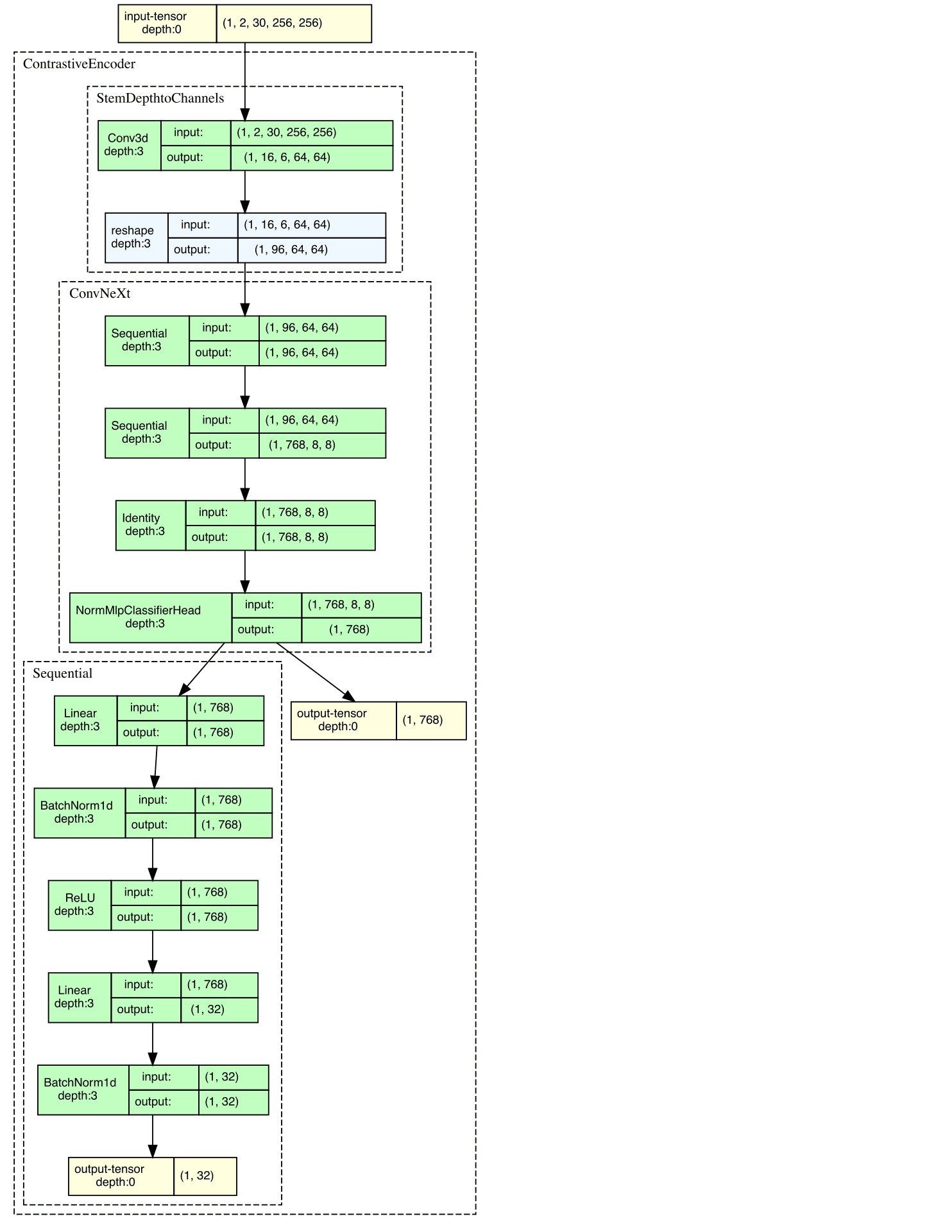
# Setup the trainer for prediction
# The trainer can be further configured to better utilize the available hardware,
# For example using GPUs and half precision.
# Callbacks can also be used to customize logging and prediction writing.
# See the API documentation for more details:
?VisCyTrainerOutput:
Init signature: VisCyTrainer(*args, **kwargs)
Docstring: <no docstring>
Init docstring:
Customize every aspect of training via flags.
Args:
accelerator: Supports passing different accelerator types ("cpu", "gpu", "tpu", "hpu", "mps", "auto")
as well as custom accelerator instances.
strategy: Supports different training strategies with aliases as well custom strategies.
Default: ``"auto"``.
devices: The devices to use. Can be set to a positive number (int or str), a sequence of device indices
(list or str), the value ``-1`` to indicate all available devices should be used, or ``"auto"`` for
automatic selection based on the chosen accelerator. Default: ``"auto"``.
num_nodes: Number of GPU nodes for distributed training.
Default: ``1``.
precision: Double precision (64, '64' or '64-true'), full precision (32, '32' or '32-true'),
16bit mixed precision (16, '16', '16-mixed') or bfloat16 mixed precision ('bf16', 'bf16-mixed').
Can be used on CPU, GPU, TPUs, or HPUs.
Default: ``'32-true'``.
logger: Logger (or iterable collection of loggers) for experiment tracking. A ``True`` value uses
the default ``TensorBoardLogger`` if it is installed, otherwise ``CSVLogger``.
``False`` will disable logging. If multiple loggers are provided, local files
(checkpoints, profiler traces, etc.) are saved in the ``log_dir`` of the first logger.
Default: ``True``.
callbacks: Add a callback or list of callbacks.
Default: ``None``.
fast_dev_run: Runs n if set to ``n`` (int) else 1 if set to ``True`` batch(es)
of train, val and test to find any bugs (ie: a sort of unit test).
Default: ``False``.
max_epochs: Stop training once this number of epochs is reached. Disabled by default (None).
If both max_epochs and max_steps are not specified, defaults to ``max_epochs = 1000``.
To enable infinite training, set ``max_epochs = -1``.
min_epochs: Force training for at least these many epochs. Disabled by default (None).
max_steps: Stop training after this number of steps. Disabled by default (-1). If ``max_steps = -1``
and ``max_epochs = None``, will default to ``max_epochs = 1000``. To enable infinite training, set
``max_epochs`` to ``-1``.
min_steps: Force training for at least these number of steps. Disabled by default (``None``).
max_time: Stop training after this amount of time has passed. Disabled by default (``None``).
The time duration can be specified in the format DD:HH:MM:SS (days, hours, minutes seconds), as a
:class:`datetime.timedelta`, or a dictionary with keys that will be passed to
:class:`datetime.timedelta`.
limit_train_batches: How much of training dataset to check (float = fraction, int = num_batches).
Value is per device. Default: ``1.0``.
limit_val_batches: How much of validation dataset to check (float = fraction, int = num_batches).
Value is per device. Default: ``1.0``.
limit_test_batches: How much of test dataset to check (float = fraction, int = num_batches).
Value is per device. Default: ``1.0``.
limit_predict_batches: How much of prediction dataset to check (float = fraction, int = num_batches).
Value is per device. Default: ``1.0``.
overfit_batches: Overfit a fraction of training/validation data (float) or a set number of batches (int).
Default: ``0.0``.
val_check_interval: How often to check the validation set. Pass a ``float`` in the range [0.0, 1.0] to check
after a fraction of the training epoch. Pass an ``int`` to check after a fixed number of training
batches. An ``int`` value can only be higher than the number of training batches when
``check_val_every_n_epoch=None``, which validates after every ``N`` training batches
across epochs or during iteration-based training.
Default: ``1.0``.
check_val_every_n_epoch: Perform a validation loop after every `N` training epochs. If ``None``,
validation will be done solely based on the number of training batches, requiring ``val_check_interval``
to be an integer value.
Default: ``1``.
num_sanity_val_steps: Sanity check runs n validation batches before starting the training routine.
Set it to `-1` to run all batches in all validation dataloaders.
Default: ``2``.
log_every_n_steps: How often to log within steps.
Default: ``50``.
enable_checkpointing: If ``True``, enable checkpointing.
It will configure a default ModelCheckpoint callback if there is no user-defined ModelCheckpoint in
:paramref:`~lightning.pytorch.trainer.trainer.Trainer.callbacks`.
Default: ``True``.
enable_progress_bar: Whether to enable to progress bar by default.
Default: ``True``.
enable_model_summary: Whether to enable model summarization by default.
Default: ``True``.
accumulate_grad_batches: Accumulates gradients over k batches before stepping the optimizer.
Default: 1.
gradient_clip_val: The value at which to clip gradients. Passing ``gradient_clip_val=None`` disables
gradient clipping. If using Automatic Mixed Precision (AMP), the gradients will be unscaled before.
Default: ``None``.
gradient_clip_algorithm: The gradient clipping algorithm to use. Pass ``gradient_clip_algorithm="value"``
to clip by value, and ``gradient_clip_algorithm="norm"`` to clip by norm. By default it will
be set to ``"norm"``.
deterministic: If ``True``, sets whether PyTorch operations must use deterministic algorithms.
Set to ``"warn"`` to use deterministic algorithms whenever possible, throwing warnings on operations
that don't support deterministic mode. If not set, defaults to ``False``. Default: ``None``.
benchmark: The value (``True`` or ``False``) to set ``torch.backends.cudnn.benchmark`` to.
The value for ``torch.backends.cudnn.benchmark`` set in the current session will be used
(``False`` if not manually set). If :paramref:`~lightning.pytorch.trainer.trainer.Trainer.deterministic`
is set to ``True``, this will default to ``False``. Override to manually set a different value.
Default: ``None``.
inference_mode: Whether to use :func:`torch.inference_mode` or :func:`torch.no_grad` during
evaluation (``validate``/``test``/``predict``).
use_distributed_sampler: Whether to wrap the DataLoader's sampler with
:class:`torch.utils.data.DistributedSampler`. If not specified this is toggled automatically for
strategies that require it. By default, it will add ``shuffle=True`` for the train sampler and
``shuffle=False`` for validation/test/predict samplers. If you want to disable this logic, you can pass
``False`` and add your own distributed sampler in the dataloader hooks. If ``True`` and a distributed
sampler was already added, Lightning will not replace the existing one. For iterable-style datasets,
we don't do this automatically.
profiler: To profile individual steps during training and assist in identifying bottlenecks.
Default: ``None``.
detect_anomaly: Enable anomaly detection for the autograd engine.
Default: ``False``.
barebones: Whether to run in "barebones mode", where all features that may impact raw speed are
disabled. This is meant for analyzing the Trainer overhead and is discouraged during regular training
runs. The following features are deactivated:
:paramref:`~lightning.pytorch.trainer.trainer.Trainer.enable_checkpointing`,
:paramref:`~lightning.pytorch.trainer.trainer.Trainer.logger`,
:paramref:`~lightning.pytorch.trainer.trainer.Trainer.enable_progress_bar`,
:paramref:`~lightning.pytorch.trainer.trainer.Trainer.log_every_n_steps`,
:paramref:`~lightning.pytorch.trainer.trainer.Trainer.enable_model_summary`,
:paramref:`~lightning.pytorch.trainer.trainer.Trainer.num_sanity_val_steps`,
:paramref:`~lightning.pytorch.trainer.trainer.Trainer.fast_dev_run`,
:paramref:`~lightning.pytorch.trainer.trainer.Trainer.detect_anomaly`,
:paramref:`~lightning.pytorch.trainer.trainer.Trainer.profiler`,
:meth:`~lightning.pytorch.core.LightningModule.log`,
:meth:`~lightning.pytorch.core.LightningModule.log_dict`.
plugins: Plugins allow modification of core behavior like ddp and amp, and enable custom lightning plugins.
Default: ``None``.
sync_batchnorm: Synchronize batch norm layers between process groups/whole world.
Default: ``False``.
reload_dataloaders_every_n_epochs: Set to a positive integer to reload dataloaders every n epochs.
Default: ``0``.
default_root_dir: Default path for logs and weights when no logger/ckpt_callback passed.
Default: ``os.getcwd()``.
Can be remote file paths such as `s3://mybucket/path` or 'hdfs://path/'
model_registry: The name of the model being uploaded to Model hub.
Raises:
TypeError:
If ``gradient_clip_val`` is not an int or float.
MisconfigurationException:
If ``gradient_clip_algorithm`` is invalid.
File: /usr/local/lib/python3.12/dist-packages/viscy/trainer.py
Type: type
Subclasses:# Initialize the trainer
# The prediction writer callback will save the predictions to an OME-Zarr store
trainer = VisCyTrainer(
callbacks=[
EmbeddingWriter(
output_path,
pca_kwargs={"n_components": 8},
phate_kwargs={"knn": 5, "decay": 40, "n_jobs": -1},
)
]
)
# Run prediction
trainer.predict(model=dynaclr_model, datamodule=datamodule, return_predictions=False)Output:
Predicting ━━━━━━━━━━━━━━━━━━━━━━━━━━━━━━━━━━━━━━━━ 34/34 0:11:06 • 0:00:00 0.07it/s
Calculating PHATE...
Running PHATE on 2171 observations and 768 variables.
Calculating graph and diffusion operator...
Calculating PCA...
Calculated PCA in 0.28 seconds.
Calculating KNN search...
Calculated KNN search in 0.28 seconds.
Calculating affinities...
Calculated affinities in 1.89 seconds.
Calculated graph and diffusion operator in 2.48 seconds.
Calculating landmark operator...
Calculating SVD...
Calculated SVD in 0.15 seconds.
Calculating KMeans...
Calculated KMeans in 3.96 seconds.
Calculated landmark operator in 4.11 seconds.
Calculating optimal t...
Automatically selected t = 34
Calculated optimal t in 4.58 seconds.
Calculating diffusion potential...
Calculated diffusion potential in 1.06 seconds.
Calculating metric MDS...
SGD-MDS may not have converged: stress changed by -2.1% in final iterations. Consider increasing n_iter or
adjusting learning_rate.
Calculated metric MDS in 2.85 seconds.
Calculated PHATE in 15.66 seconds.Model Outputs
The model outputs are also stored in an ANNData. The embeddings can then be visualized with a dimensionality reduction method (i.e UMAP, PHATE, PCA)
# NOTE: We have chosen these tracks to be representative of the data. Feel free to open the dataset and select other tracks
features_anndata = read_zarr(output_path)
annotation = pd.read_csv(annotations_path)
ANNOTATION_COLUMN = "infection_state"

# Combine embeddings and annotations
# Reload annotation to ensure clean state (in case cell is re-run)
annotation = pd.read_csv(annotations_path)

# Strip whitespace from fov_name to match features
annotation["fov_name"] = annotation["fov_name"].str.strip()

# Merge on (fov_name, track_id, t) as these uniquely identify each cell observation
annotation_indexed = annotation.set_index(["fov_name", "track_id", "t"])
mi = pd.MultiIndex.from_arrays(
    [
        features_anndata.obs["fov_name"],
        features_anndata.obs["track_id"],
        features_anndata.obs["t"],
    ],
    names=["fov_name", "track_id", "t"],
)
features_anndata.obs["annotations_infections_state"] = annotation_indexed.reindex(mi)[
    ANNOTATION_COLUMN
].values

# Plot the PCA and PHATE embeddings colored by infection state
# Prepare data for plotting
# Map numeric labels to readable labels for legend
infection_state_labels = {0: "Unknown", 1: "Uninfected", 2: "Infected"}

plot_df = pd.DataFrame(
    {
        "PC1": features_anndata.obsm["X_pca"][:, 0],
        "PC2": features_anndata.obsm["X_pca"][:, 1],
        "PHATE1": features_anndata.obsm["X_phate"][:, 0],
        "PHATE2": features_anndata.obsm["X_phate"][:, 1],
        "infection_state": features_anndata.obs["annotations_infections_state"]
        .fillna(0)
        .map(infection_state_labels),
    }
)

# Define color palette (colorblind-friendly: blue for uninfected, orange for infected)
color_palette = {
    "Unknown": "lightgray",  # Unlabeled
    "Uninfected": "cornflowerblue",  # Uninfected
    "Infected": "darkorange",  # Infected
}

# Create figure with two subplots
fig, axes = plt.subplots(1, 2, figsize=(14, 6))

# Plot PCA
sns.scatterplot(
    data=plot_df,
    x="PC1",
    y="PC2",
    hue="infection_state",
    palette=color_palette,
    ax=axes[0],
    alpha=0.6,
    s=20,
)
axes[0].set_title("PCA Embedding")
axes[0].set_xlabel("PC1")
axes[0].set_ylabel("PC2")

# Plot PHATE
sns.scatterplot(
    data=plot_df,
    x="PHATE1",
    y="PHATE2",
    hue="infection_state",
    palette=color_palette,
    ax=axes[1],
    alpha=0.6,
    s=20,
)
axes[1].set_title("PHATE Embedding")
axes[1].set_xlabel("PHATE 1")
axes[1].set_ylabel("PHATE 2")

plt.tight_layout()
plt.show()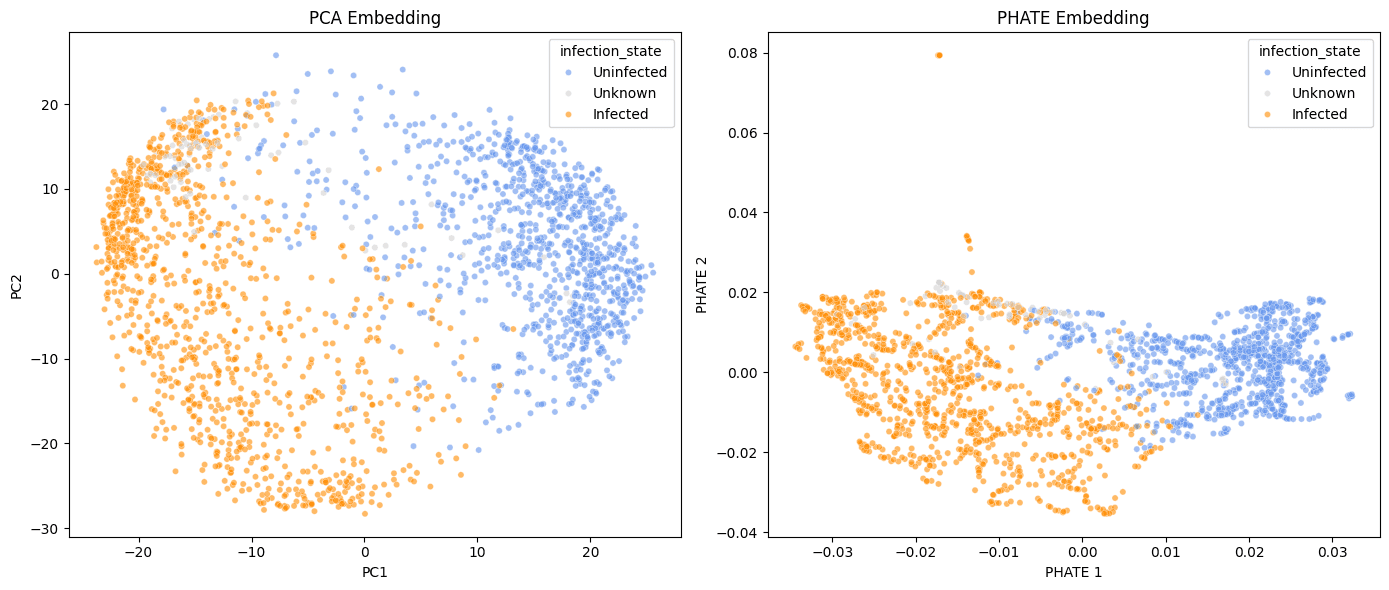
Visualize Images Over Time
Below we show phase and fluorescence images of the uninfected and infected cells over time.
# NOTE: We have chosen these tracks to be representative of the data. Feel free to open the dataset and select other tracks
fov_name_mock = "A/3/9"
track_id_mock = [19]
fov_name_inf = "B/4/9"
track_id_inf = [42]


## Show the images over time
def get_patch(data, cell_centroid, patch_size):
    """Extract patch centered on cell centroid across all channels.

    Parameters
    ----------
    data : ndarray
        Image data with shape (C, Y, X) or (Y, X)
    cell_centroid : tuple
        (y, x) coordinates of cell centroid
    patch_size : int
        Size of the square patch to extract

    Returns
    -------
    ndarray
        Extracted patch with shape (C, patch_size, patch_size) or (patch_size, patch_size)
    """
    y_centroid, x_centroid = cell_centroid
    x_start = max(0, x_centroid - patch_size // 2)
    x_end = min(data.shape[-1], x_centroid + patch_size // 2)
    y_start = max(0, y_centroid - patch_size // 2)
    y_end = min(data.shape[-2], y_centroid + patch_size // 2)

    if data.ndim == 3:  # CYX format
        patch = data[:, int(y_start) : int(y_end), int(x_start) : int(x_end)]
    else:  # YX format
        patch = data[int(y_start) : int(y_end), int(x_start) : int(x_end)]
    return patch


# Open the dataset
plate = open_ome_zarr(input_data_path)
uninfected_position = plate[fov_name_mock]
infected_position = plate[fov_name_inf]

# Get channel indices for the channels we want to display
channel_names = uninfected_position.channel_names
channels_to_display_idx = [channel_names.index(c) for c in channels_to_display]

# Filter the centroids of these two tracks
filtered_centroid_mock = features_anndata.obs[
    (features_anndata.obs["fov_name"] == fov_name_mock)
    & (features_anndata.obs["track_id"].isin(track_id_mock))
].sort_values("t")
filtered_centroid_inf = features_anndata.obs[
    (features_anndata.obs["fov_name"] == fov_name_inf)
    & (features_anndata.obs["track_id"].isin(track_id_inf))
].sort_values("t")

# Define patch size for visualization
patch_size = 160

# Extract patches for uninfected cells over time
import numpy as np

uinfected_stack = []
for idx, row in filtered_centroid_mock.iterrows():
    t = int(row["t"])
    # Load the image data for this timepoint (CZYX format), select only required channels
    img_data = uninfected_position.data[
        t, channels_to_display_idx, z_range[0] : z_range[1]
    ]
    # For Phase3D take middle slice, for fluorescence take max projection
    cyx = []
    for ch_idx, ch_name in enumerate(channels_to_display):
        if ch_name == "Phase3D":
            # Take middle Z slice for phase
            mid_z = img_data.shape[1] // 2
            cyx.append(img_data[ch_idx, mid_z, :, :])
        else:
            # Max projection for fluorescence
            cyx.append(img_data[ch_idx].max(axis=0))
    cyx = np.array(cyx)
    uinfected_stack.append(get_patch(cyx, (row["y"], row["x"]), patch_size))
uinfected_stack = np.array(uinfected_stack)

# Extract patches for infected cells over time
infected_stack = []
for idx, row in filtered_centroid_inf.iterrows():
    t = int(row["t"])
    # Load the image data for this timepoint (CZYX format), select only required channels
    img_data = infected_position.data[
        t, channels_to_display_idx, z_range[0] : z_range[1]
    ]
    # For Phase3D take middle slice, for fluorescence take max projection
    cyx = []
    for ch_idx, ch_name in enumerate(channels_to_display):
        if ch_name == "Phase3D":
            # Take middle Z slice for phase
            mid_z = img_data.shape[1] // 2
            cyx.append(img_data[ch_idx, mid_z, :, :])
        else:
            # Max projection for fluorescence
            cyx.append(img_data[ch_idx].max(axis=0))
    cyx = np.array(cyx)
    infected_stack.append(get_patch(cyx, (row["y"], row["x"]), patch_size))
infected_stack = np.array(infected_stack)

# Interactive visualization for Google Colab
# This creates an interactive widget to scrub through timepoints
try:
    import numpy as np
    from ipywidgets import IntSlider, interact

    max_t = min(len(uinfected_stack), len(infected_stack))

    def plot_timepoint(t):
        """Plot both infected and uninfected cells at a specific timepoint"""
        fig, axes = plt.subplots(2, 2, figsize=(10, 10))
        fig.suptitle(f"Timepoint: {t}", fontsize=16)

        # Plot uninfected cell
        for channel_idx, channel_name in enumerate(channels_to_display):
            ax = axes[0, channel_idx]
            img = uinfected_stack[t, channel_idx, :, :]
            ax.imshow(img, cmap="gray")
            ax.set_title(f"Uninfected - {channel_name}")
            ax.axis("off")

        # Plot infected cell
        channel_names = uninfected_position.channel_names
        channels_to_display_idx = [channel_names.index(c) for c in channels_to_display]
        for channel_idx, channel_name in enumerate(channels_to_display_idx):
            ax = axes[1, channel_idx]
            img = infected_stack[t, channel_idx, :, :]
            ax.imshow(img, cmap="gray")
            ax.set_title(f"Infected - {channel_name}")
            ax.axis("off")

        plt.tight_layout()
        plt.show()

    # Create interactive slider
    interact(
        plot_timepoint,
        t=IntSlider(min=0, max=max_t - 1, step=1, value=0, description="Timepoint:"),
    )

except ImportError:
    # Fallback to static plot if ipywidgets not available
    print("ipywidgets not available, showing static plots instead")

    # Plot 10 equally spaced timepoints
    n_timepoints = 10
    max_t = min(len(uinfected_stack), len(infected_stack))
    timepoint_indices = np.linspace(0, max_t - 1, n_timepoints, dtype=int)

    # Create figure with 2 rows (channels) x 10 columns (timepoints) for uninfected
    fig, axes = plt.subplots(2, n_timepoints, figsize=(20, 4))
    fig.suptitle("Uninfected Cell Over Time", fontsize=16, y=1.02)
    channel_names = uninfected_position.channel_names
    channels_to_display_idx = [channel_names.index(c) for c in channels_to_display]
    for channel_idx, channel_name in enumerate(channels_to_display):
        for col_idx, t_idx in enumerate(timepoint_indices):
            ax = axes[channel_idx, col_idx]
            img = uinfected_stack[t_idx, channel_idx, :, :]
            ax.imshow(img, cmap="gray")
            ax.axis("off")
            if channel_idx == 0:
                ax.set_title(f"t={t_idx}", fontsize=10)
            if col_idx == 0:
                ax.set_ylabel(channel_name, fontsize=12)

    plt.tight_layout()
    plt.show()

    # Create figure with 2 rows (channels) x 10 columns (timepoints) for infected
    fig, axes = plt.subplots(2, n_timepoints, figsize=(20, 4))
    fig.suptitle("Infected Cell Over Time", fontsize=16, y=1.02)

    for channel_idx, channel_name in enumerate(channels_to_display):
        for col_idx, t_idx in enumerate(timepoint_indices):
            ax = axes[channel_idx, col_idx]
            img = infected_stack[t_idx, channel_idx, :, :]
            ax.imshow(img, cmap="gray")
            ax.axis("off")
            if channel_idx == 0:
                ax.set_title(f"t={t_idx}", fontsize=10)
            if col_idx == 0:
                ax.set_ylabel(channel_name, fontsize=12)

    plt.tight_layout()
    plt.show()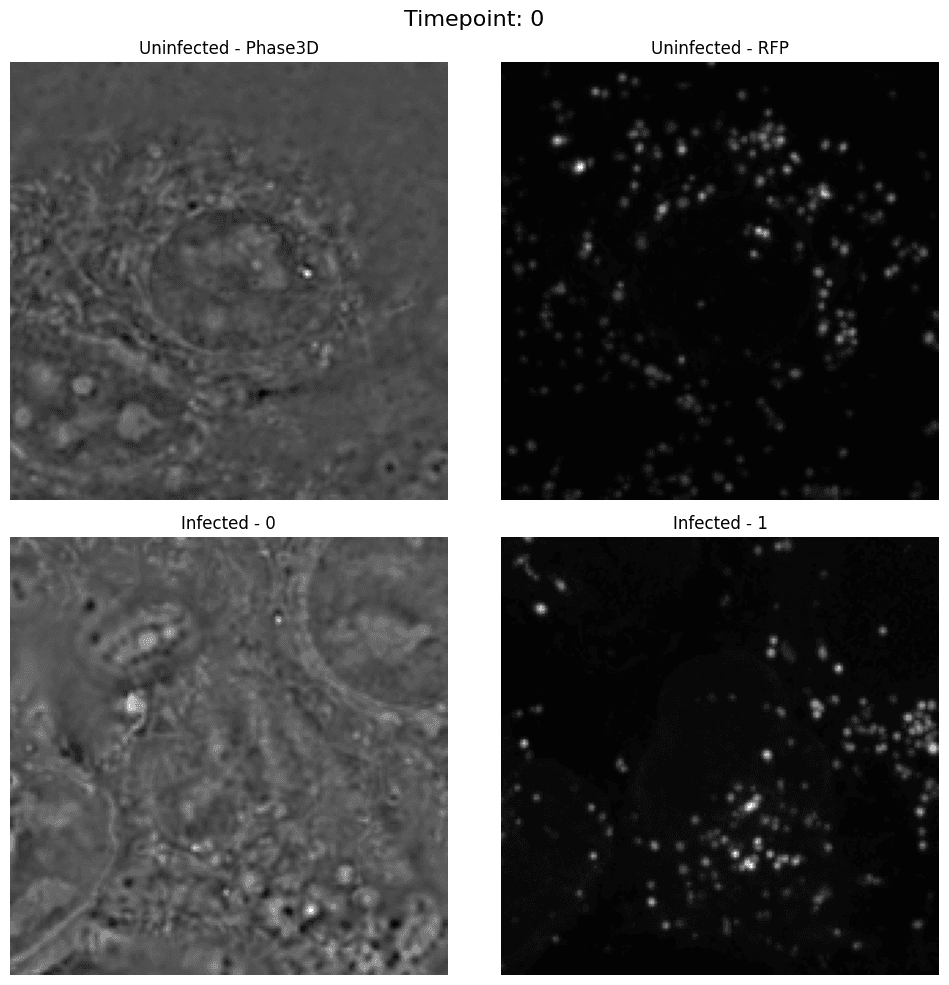
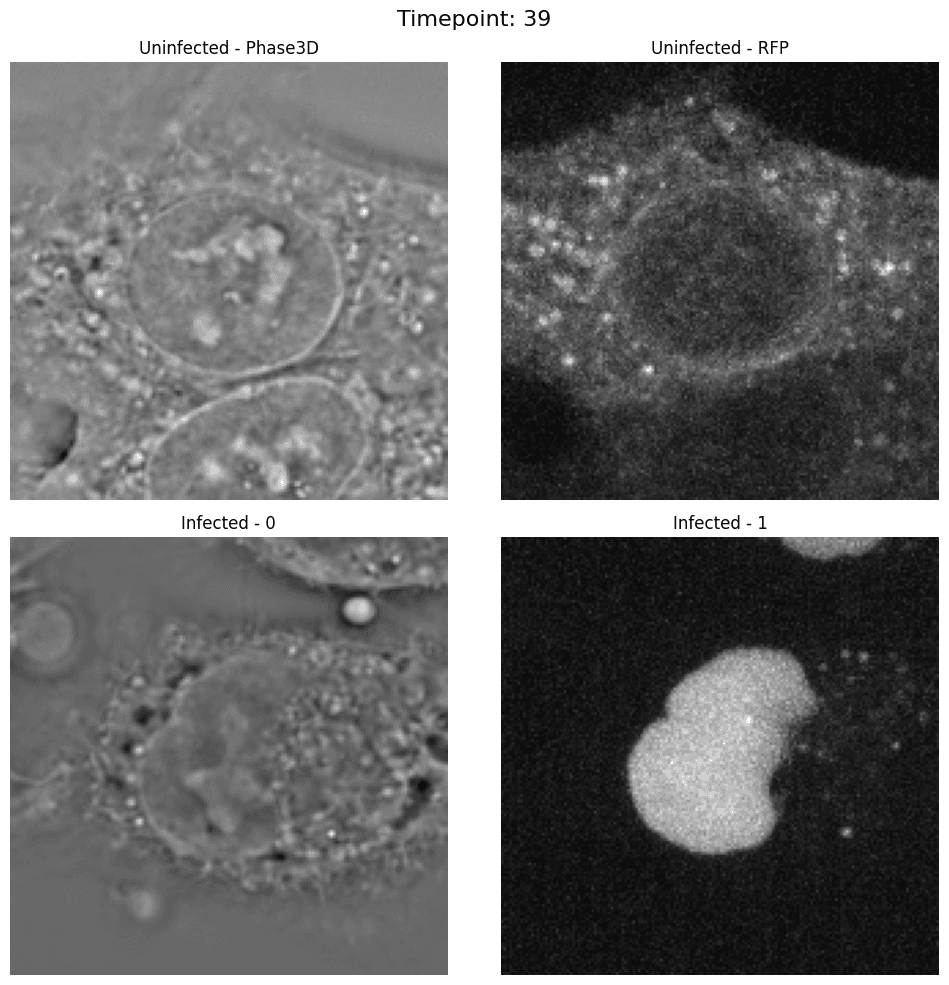
To view the interactive output, please run the code in a local environment or Google Colab.
Contact Information
For issues with this notebook please contact eduardo.hirata@czbiohub.org.
Responsible Use
We are committed to advancing the responsible development and use of artificial intelligence. Please follow our Acceptable Use Policy when engaging with our services.
Should you have any security or privacy issues or questions related to the services, please reach out to our team at security@chanzuckerberg.com or privacy@chanzuckerberg.com respectively.