Quickstart: Octopi
Predicting Macromolecules in CryoET Tomograms
Estimated time to complete: 20 Minutes
Learning Goals
By the end of this quickstart you will be able to:
- Load trained models
- Run inference to generate 3D segmentation masks
- Convert those masks into coordinate predictions
- Evaluate prediction quality by comparing to ground truth coordinates
Prerequisites
python >= 3.9- T4 GPU
Introduction
Octopi (Object deteCTion Of ProteIns) is a deep learning framework for cryo-electron tomography (cryoET) 3D particle picking with autonomous model exploration capabilities that allows for efficient identification and extraction of proteins within complex cellular environments. Its deep learning-based pipeline streamlines the training and execution of 3D autoencoder models specifically designed for cryoET particle picking. Octopi uses a U-Net architecture with six encoder-decoder levels optimized for multi-class particle picking in cryoET. Octopi is built on copick, a storage-agnostic API, which allows it to easily access tomograms and segmentations across both local and remote environments.
This quickstart will guide you through applying a trained Octopi model to perform segmentation inference on experimental cryoET datasets.
Model Inputs
- Model configuration file
- Model weights file
Setup
Select the Google Colab T4 GPU runtime option to run this quickstart. At the time of publication Colab was run on Python 3.12.
Installation
Octopi can be installed using PyPI or cloned from the Git repository. After you clone the repository, wait until the dependencies are installed. A popup from Colab may appear prompting you to restart the session. Then restart the session and run the cell again.
#Install octopi with the repository
#If the "restart" button appears, restart the session and run this cell again.

!git clone https://github.com/chanzuckerberg/octopi.git
%cd octopi
!pip install -e .
%cd ..
Download model weights
Next, download pretrained model weights and the model configuration into the repository.
!curl -LO https://czi-octopi.s3.us-west-2.amazonaws.com/weights/best_model.pth
!curl -LO https://czi-octopi.s3.us-west-2.amazonaws.com/weights/model_config.yaml%lsOutput:
best_model.pth model_config.yaml octopi/ sample_data/Perform Segmentation Inference on Test Dataset
Now that you have a trained model set up, you can make predictions. In this step, you will execute model inference using a checkpoint from a saved epoch, allowing you to evaluate the model's performance on your test dataset.
First, we need to generate a configuration file that lets us easily pull tomgorams from the data portal and write the predicted segmentation maps into our local compute environment. In this case we will run predictions on the public test dataset from the CZ Imaging Institute Machine Learning Challenge (Dataset ID: 10445).
import os, copick

dataset_id = 10440
copick_config_path = os.path.abspath(f'./config_{dataset_id}.json')
overlay_path = os.path.abspath('./tmp_overlay')
copick_root = copick.from_czcdp_datasets(
    [dataset_id], #dataset_id
    overlay_path,
    {'auto_mkdir': True}, #overlay_root, self-defined
    output_path = copick_config_path,
)from octopi.pytorch import segmentation
import os
########### Input Parameters ###########
# Copick query for tomograms to run inference on
copick_config = '/content/config_10440.json'
tomo_algorithm = 'wbp-denoised-denoiset-ctfdeconv'
voxel_size = 10.012
# Path to trained model
model_weights = 'best_model.pth'
model_config = 'model_config.yaml'
# Generate the octopi segmentor
segmentor = segmentation.Predictor(
copick_config,
model_config,
model_weights,
)
# We can adjust the sliding window Parameters, for faster inference
segmentor.sw = 2
segmentor.overlap = 0.25Model Inference
We'll now create the data pipeline to feed tomographic data into the model and execute inference. This notebook uses a convenient Python interface for inference, but if you're working outside the notebook or at scale, you can run the equivalent command-line tool:
octopi segmentWe can either run segmentation on a single volume with the segmentor.predict function or run inference on all the tomograms inside of a copick project. Run the following cell to run segmentation on a single volume.
from copick.util.uri import resolve_copick_objects as reader
from octopi.utils import visualization_tools as viz
import matplotlib.pyplot as plt
import copick

# Load the copick/DataPortal project
root = copick.from_file(copick_config)

run_ids = [run.name for run in root.runs ]
print(f'Available RunIDs: {run_ids}')

# We can load tomograms hosted on the DataPortal with the Copick URI-reader
# Here, we reference the algorithm name, and voxel-size for the given run
print('Getting the Tomogram...')
out = reader(f'wbp-denoised-denoiset-ctfdeconv@{voxel_size}', root, 'tomogram', run_ids[0])
vol = out[0].numpy()

# Running inference
print('Running Segmentation...')
seg = segmentor.predict(vol)

# Display the Results
viz.interact_3d_seg(vol, seg)Output:
Available RunIDs: ['16463', '16464', '16465', '16466', '16467', '16468', '16469']
Getting the Tomogram...
Running Segmentation...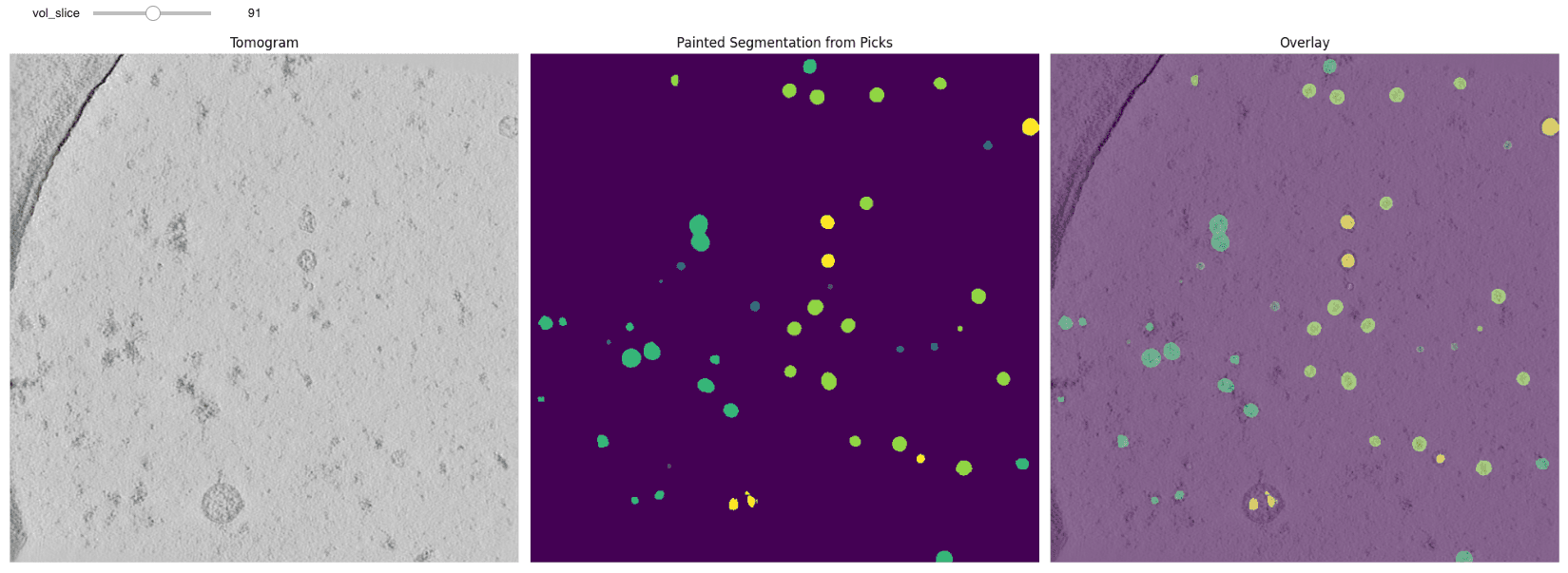
To view the interactive output, please run the code in a local environment or Google Colab.
We can also run inference on all the tomograms inside of a copick project, which will save the segmentations under the following query - specified in the seg_info list.
# Output save information (Segmentation Name, UserID, SessionID)
seg_info = ['predict', 'octopi', '1']

# Run batch prediction
segmentor.batch_predict(
    num_tomos_per_batch=4,
    tomo_algorithm=tomo_algorithm,
    voxel_spacing=voxel_size,
    segmentation_name=seg_info[0],
    segmentation_user_id=seg_info[1],
    segmentation_session_id=seg_info[2]
)Output:
Parameters for Inference (Segment Prediction):
{'inputs': {'config': '/content/config_10440.json',
'tomo_alg': 'wbp-denoised-denoiset-ctfdeconv',
'voxel_size': 10.012},
'labels': {'beta-amylase': 2,
'beta-galactosidase': 3,
'cytosolic-ribosome': 4,
'ferritin-complex': 1,
'thyroglobulin': 5,
'virus-like-capsid': 6},
'model': {'configs': ['model_config.yaml'], 'weights': ['best_model.pth']},
'outputs': {'seg_name': 'predict',
'seg_session_id': '1',
'seg_user_id': 'octopi'}}
Running Inference on the Following RunIDs: ['16463', '16464', '16465', '16466']
100%|██████████| 4/4 [00:53<00:00, 13.44s/it]
Loading dataset: 100%|██████████| 4/4 [00:01<00:00, 2.28it/s]
100%|██████████| 2/2 [01:02<00:00, 31.14s/it]
Running Inference on the Following RunIDs: ['16467', '16468', '16469']
100%|██████████| 3/3 [00:41<00:00, 13.99s/it]
Loading dataset: 100%|██████████| 3/3 [00:01<00:00, 2.21it/s]
100%|██████████| 2/2 [00:47<00:00, 23.50s/it]
✅ Predictions Complete!Converting segmentation masks to 3D coordinates
In this step, we convert the segmentation masks predicted by the model into discrete 3D coordinate locations representing the centers of macromolecules. You can run the equivalent CLI tool:
octopi localize --helpEach segmentation mask highlights regions in the tomogram where the model believes a specific macromolecule is present. To transform these continuous volumetric predictions into biologically meaningful particle coordinates, we apply a post-processing pipeline that includes:
- Thresholding the segmentation mask to isolate high-confidence regions
- Size filtering based on expected macromolecule volume (e.g., diameter or voxel count)
- Centroid extraction from connected components that match the size profile
This process enables us to generate a precise list of coordinates that can be directly compared to ground truth annotations or used as input for downstream structural analysis.
By tuning the filtering parameters (e.g., minimum/maximum particle size), the pipeline can be adapted to different targets such as ribosomes, proteasomes, or other cellular components.
from octopi.workflows import localize

########### Input Parameters ###########

# Copick query for tomograms to run inference on
copick_config = '/content/config_10440.json'

# Voxel size of segmentation maps
voxel_size = 10.012

# Information for the referenced segmentation map
seg_info = ['predict', 'octopi', '1']

# Information for the saved pick session
picks_info = ['octopi', '1'] # user_id, session_id
This following code can take an estimated 10 minutes to run.
# Now lets run the code
localize(
    copick_config, voxel_size, seg_info,
    picks_info[0], picks_info[1], n_procs = 2,
    radius_max_scale = 5 )
(Optional): Visualize the coordinates
Octopi contains two functions that allows users to assess the localized coordiantes. First is show_tomo_points that overlays the coordinates over the tomogram. The second function compare_tomo_points compares coordinates stemming from two sources. This is particularly useful when comparing two picking algorithms, or the a model against the ground truth.
from copick.util.uri import resolve_copick_objects as reader
import copick

# Copick query for tomograms to run inference on
config = "/content/config_10440.json"
tomo_algorithm = 'wbp-denoised-denoiset-ctfdeconv'
voxel_size = 10.012

# Read the Copick project
root = copick.from_file(config)
run_ids = [run.name for run in root.runs ]

# Get a tomogram for run
print('Loading Tomogram....')
vol = reader(f'wbp-denoised-denoiset-ctfdeconv@{voxel_size}', root, 'tomogram', run_ids[1])
vol = vol[0].numpy()

# Display the Results
viz.interact_points(vol, config, run_ids[1], pt_size=30)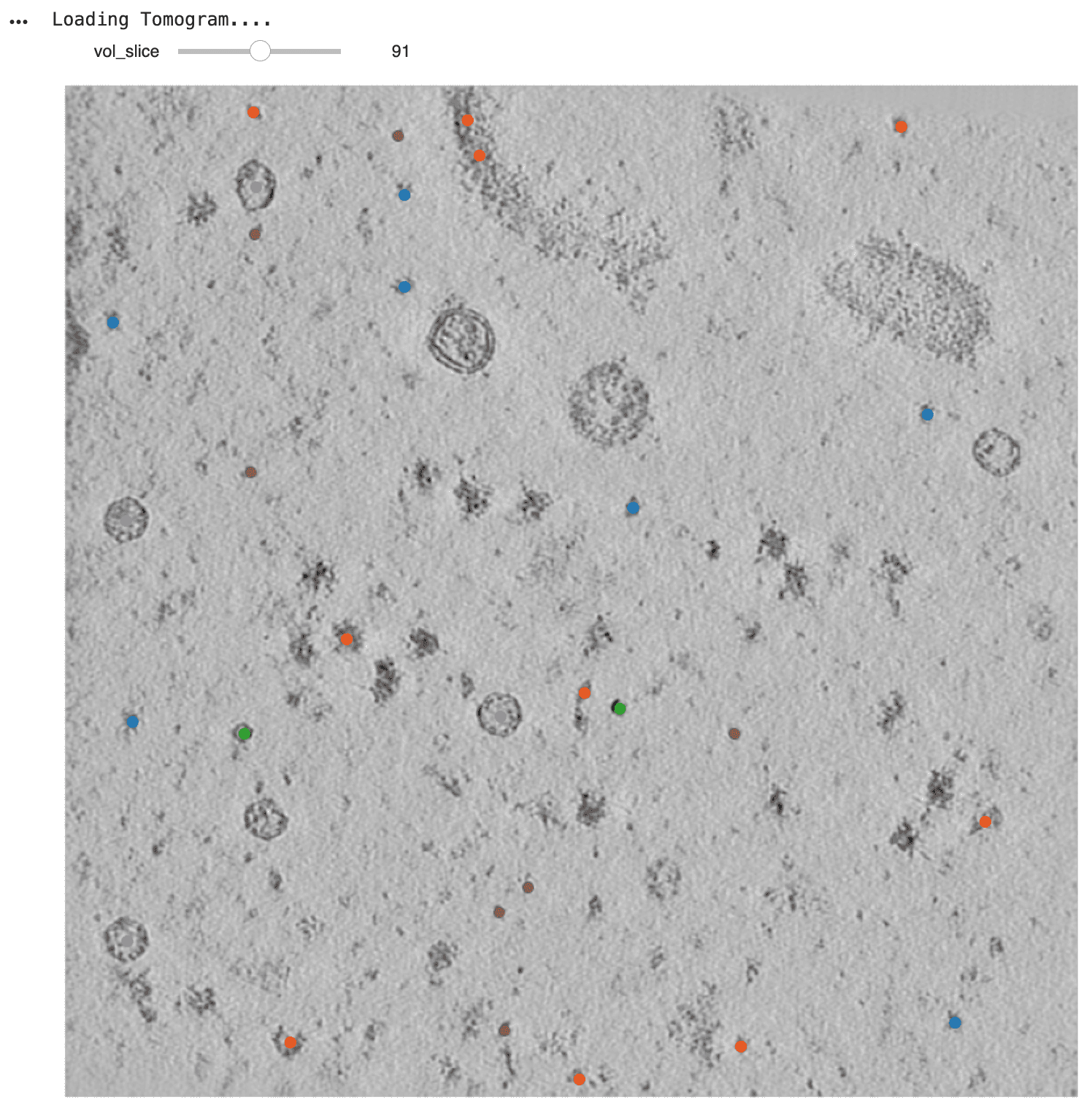
To view the interactive output, please run the code in a local environment or Google Colab.
Evaluating the predicted coordinates
In this step, we evaluate the accuracy of the 3D protein coordinates predicted by the trained model. These coordinates, derived from segmentation masks, are compared against manually annotated ground truth positions to assess the model's performance in detecting macromolecules within cryoET tomograms.
octopi evaluate --helpUsing the evaluator class from octopi.processing.evaluate, we compute a comprehensive set of object-level metrics for each tomogram and macromolecular species, including:
1. Precision, 2. Recall, 3. F1 Score, Fβ Score 4. Type I & II Error (True/False Positives / Negatives)
The evaluation is performed per particle type (e.g., ribosome, apoferritin) and per tomogram, then aggregated across all run IDs.
Evaluation details
For the Machine Learning Challenge, the designated evaluation metric was the Fβ score with β = 4 and a distance threshold scale of 0.5. This configuration accounts for potential incompleteness in ground truth annotations while emphasizing recall, which ensures that predicted coordinates are not just present, but accurately centered on the macromolecule.
This evaluation framework provides a robust and standardized approach to benchmark instance segmentation models for cryoET. It is essential for:
- Measuring predictive performance across particle types
- Comparing model variants and optimization strategies
- Participating in formal benchmarking tasks like the CZ Imaging Institute ML Challenge
import octopi.processing.evaluate as evaluate

########### Input Parameters ###########

config = '/content/config_10440.json'

# Information for the Ground Truth Segmentation Map
ground_truth_user_id = 'data-portal'
ground_truth_session_id = None

# Information for the Predicted Segmentation Map
predict_user_id = 'octopi'
predict_session_id = '1'

# Information for the Objects to Evaluate
object_names = None

# Distance Threshold Scale
distance_threshold_scale = 0.5

# RunIDs to Run Evaluation On
# Either we can process all the runs or a single run
runIDs = None
# runIDs = ['16464'] - Single Run Evaluation
Finally, we evaluate the quality of our predicted coordinates.
eval = evaluate.evaluator(
        config,
        ground_truth_user_id,
        ground_truth_session_id,
        predict_user_id,
        predict_session_id,
        object_names=object_names
    )

eval.run(distance_threshold_scale=distance_threshold_scale, runIDs=runIDs)Output:
Running Evaluation on the Following Copick Project: /content/config_10440.json
Ground Truth Query:
UserID: data-portal, SessionID: None
Submitted Picks:
UserID: octopi, SessionID: 1
No object names provided, using all pickable objects
Using the following valid objects: ['thyroglobulin', 'cytosolic-ribosome', 'ferritin-complex', 'beta-galactosidase', 'virus-like-capsid', 'beta-amylase']
Running Metrics Evaluation on the Following RunIDs: ['16463', '16464', '16465', '16466', '16467', '16468', '16469']
Average Metrics Summary:
thyroglobulin: [Recall: 0.377 ± 0.057, Precision: 0.112 ± 0.022, F1 Score: 0.172 ± 0.029, F_beta Score: 0.329 ± 0.048, False_Positives: 104.3 ± 16.9, False_Negatives: 21.9 ± 5.4]
cytosolic-ribosome: [Recall: 0.463 ± 0.068, Precision: 0.238 ± 0.065, F1 Score: 0.311 ± 0.070, F_beta Score: 0.437 ± 0.068, False_Positives: 70.0 ± 19.9, False_Negatives: 25.1 ± 9.6]
ferritin-complex: [Recall: 0.896 ± 0.051, Precision: 0.537 ± 0.053, F1 Score: 0.669 ± 0.045, F_beta Score: 0.861 ± 0.045, False_Positives: 43.3 ± 22.7, False_Negatives: 5.9 ± 3.5]
beta-galactosidase: [Recall: 0.573 ± 0.133, Precision: 0.211 ± 0.071, F1 Score: 0.305 ± 0.090, F_beta Score: 0.517 ± 0.122, False_Positives: 31.6 ± 4.3, False_Negatives: 6.1 ± 2.2]
virus-like-capsid: [Recall: 0.890 ± 0.098, Precision: 0.704 ± 0.157, F1 Score: 0.781 ± 0.131, F_beta Score: 0.875 ± 0.101, False_Positives: 6.3 ± 3.5, False_Negatives: 1.9 ± 1.5]
beta-amylase: [Recall: 0.543 ± 0.127, Precision: 0.142 ± 0.055, F1 Score: 0.221 ± 0.075, F_beta Score: 0.458 ± 0.111, False_Positives: 39.4 ± 5.9, False_Negatives: 5.3 ± 1.9]
Calculating Final F-beta Score using per-particle approach:
thyroglobulin: TP=91, FP=730, FN=153, Precision=0.111, Recall=0.373, F-beta=0.327, Weight=2
cytosolic-ribosome: TP=155, FP=490, FN=176, Precision=0.240, Recall=0.468, F-beta=0.444, Weight=1
ferritin-complex: TP=334, FP=303, FN=41, Precision=0.524, Recall=0.891, F-beta=0.856, Weight=1
beta-galactosidase: TP=60, FP=221, FN=43, Precision=0.214, Recall=0.583, F-beta=0.529, Weight=2
virus-like-capsid: TP=100, FP=44, FN=13, Precision=0.694, Recall=0.885, F-beta=0.871, Weight=1
beta-amylase: TP=46, FP=276, FN=37, Precision=0.143, Recall=0.554, F-beta=0.474, Weight=0
Final Kaggle Submission Score: 0.555Model Outputs
At the end of this quickstart you will have:
- Visualizations of volume segmentation predictions of selected tomograms
- Visualizations of 3D coordinate predictions of selected tomograms
- Evaluation of predicted coordinate quality
Contact and Acknowledgments
For issues with this quickstart please contact: jonathan.schwartz@czii.org
Responsible Use
We are committed to advancing the responsible development and use of artificial intelligence. Please follow our Acceptable Use Policy when engaging with our services.
Should you have any security or privacy issues or questions related to the services, please reach out to our team at security@chanzuckerberg.com or privacy@chanzuckerberg.com respectively.