Quickstart: SABER
Predicting Vesicles in CryoET Tomograms
Estimated time to complete: 20 minutes
Learning Goals
By the end of this quickstart, you will be able to:
- Load trained models
- Run inference to generate 3D segmentation masks
Prerequisites
python >= 3.9- T4 GPU or better
Introduction
SABER (Segment Anything Based Expert Recognition) is a deep learning framework built on top of Meta's Foundational Segmentation model Segment Anything 2. SABER enables segmentation directly from video-based training translated into effective 3D tomogram analysis. Users can utilize zero-shot inference with morphological heuristics or enhance prediction accuracy through data-driven training. SABER is built on copick, a storage-agnostic API, which allows it to easily access tomograms and segmentations across both local and remote environments.
This quickstart will guide you through applying a trained SABER model to perform segmentation inference on experimental cryo-electron tomography (CryoET) datasets.
Model Inputs
- Model configuration file
- Model weights file
Setup
Select the Google Colab T4 GPU runtime option to run this quickstart. At the time of publication Colab was run on Python 3.12.
Installation
SABER can be installed using PyPI or cloned from the Git repository. After you clone the repository, wait until the dependencies are installed and you see an message asking to restart the session. Then restart the session and confirm you are in the main folder of the repository.
#Install from repository

!git clone https://github.com/chanzuckerberg/saber.git
%cd saber
!pip install -e .
%cd ..

# This can create a psutil warning, simply restart the colab runtime after
# installation to ensure the new version is loaded.
Download model weights
Next, download pretrained model weights and the model configuration into the repository.
!curl -LO https://czi-saber.s3.us-west-2.amazonaws.com/weights/best_model.pth
!curl -LO https://czi-saber.s3.us-west-2.amazonaws.com/weights/model_config.yaml
Configure a copick project
Now we will configure a copick project that allows access to tomograms from the CryoET Data Portal. We will generate a configuration file for the lysosome/endosome dataset, which is what this SABER model is trained to identify.
# Create config file

import os, copick

dataset_id = 10444
copick_config_path = os.path.abspath(f'./config_{dataset_id}.json')
overlay_path = os.path.abspath('./overlay')
copick_root = copick.from_czcdp_datasets(
    [dataset_id], #dataset_id
    overlay_path,
    {'auto_mkdir': True}, #overlay_root, self-defined
    output_path = copick_config_path,
)
With the configuration file set up for copick, let's load a tomogram from this dataset. Refer to the copick documentation for more information about this library.
from copick.util.uri import resolve_copick_objects as reader
import matplotlib.pyplot as plt
import copick

print('Getting the Tomogram...')
config = 'config_10444.json'
root = copick.from_file(config)

# We can Load Tomograms Hosted on the DataPortal with the Copick URI-Reader
out = reader('wbp-denoised-denoiset-ctfdeconv@4.99', root, 'tomogram', '16689')
vol = out[0].numpy()

# For the google colab environment, we'll downsample the tomogram to 10 A
vol = vol[::2,::2,::2]# (Optional): Display A Slice in the Tomogram
# plt.figure(figsize=(6,6))
# plt.imshow(vol[75,],cmap='gray')
# plt.axis('off')Run Model Inference
Now that we loaded the volume in our compute environment, we will generate segmentations. SABER offers two opportunies to segment the data:
- 2D slabs from any depth inside of the volume
- The Slab projects are subsequently used to generate 3D segmentations.
To run either of the workflows, let's first call the segmentation class.
from saber.segmenters.tomo import cryoTomoSegmenter
from saber.classifier.models import common

model_weights = 'best_model.pth'
model_config = 'model_config.yaml'
predictor = common.get_predictor(model_weights, model_config)
seg = cryoTomoSegmenter(classifier=predictor)
Segment slabs in 2D
We can call the segmentation class to generate these segmentations. To increase the SNR, we typically run SABER on a slab within the tomogram. The slab thickness can be adjusted as an input parameter.
slab_thickness = 10
mask2d = seg.segment_slab(vol, slab_thickness, display_image=True)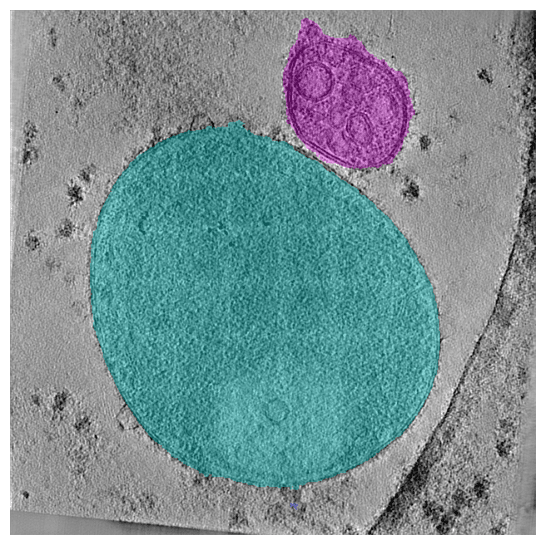
Generate 3D segmentations of tomograms
We can also generate 3D segmentations for the entire tomogram. The input parameters are identical and we can use a SABER visualization function to slice through the tomogram to see see the lysosome segmentation in 3D.
from saber.visualization.interactive import view_3d_seg

slab_thickness = 10
mask3d = seg.segment_vol(vol, slab_thickness)
view_3d_seg(vol, mask3d)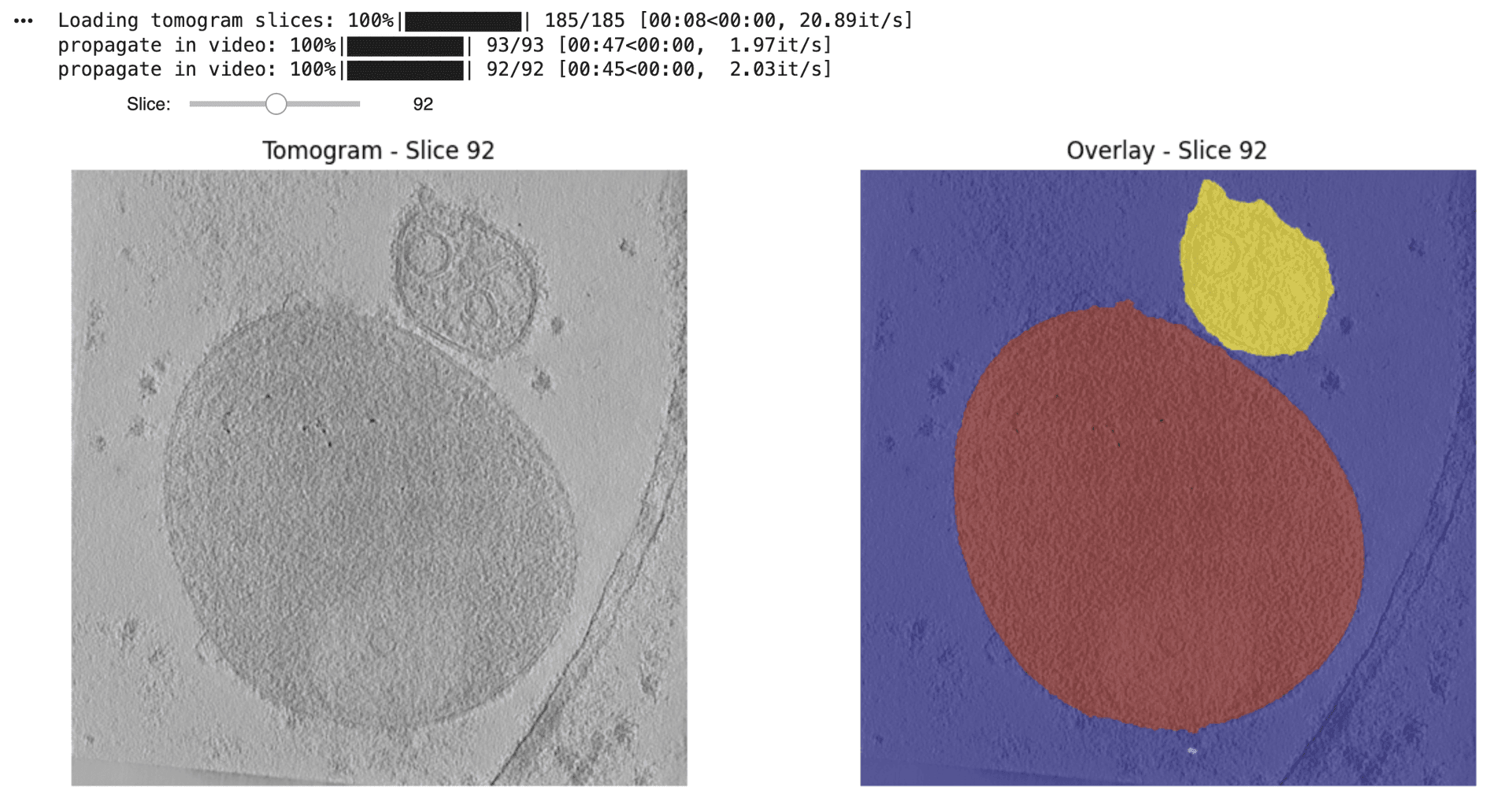
To view the interactive 3D segmentation, please run the code in a local environment or Google Colab.
Model Outputs
By the end of this quickstart, you will have:
- 2D segmentations from a selected tomogram
- 3D segmentations from that tomogram
Contact and Acknowledgments
For issues with this quickstart please contact: jonathan.schwartz@czii.org.
References
Responsible Use
We are committed to advancing the responsible development and use of artificial intelligence. Please follow our Acceptable Use Policy when engaging with our services.
Should you have any security or privacy issues or questions related to the services, please reach out to our team at security@chanzuckerberg.com or privacy@chanzuckerberg.com respectively.